

AI Photo Booth FAQ: Setup Time, Cost & Technical Requirements

Whether you are planning a product launch, corporate gala, or brand activation, understanding what goes into an AI photo booth setup saves time, money, and last-minute panic. Below we answer the seven most common questions event planners ask before booking.
How Long Does Setup Take?
Most AI photo booth providers can be fully operational in 15 to 30 minutes. PONS.ai's cloud-based architecture means there is no bulky equipment to assemble — a single operator arrives with a camera station, a display screen, and a laptop or tablet. Because AI handles background removal and style transfer in real time, there is no green screen to rig and no lighting kit to calibrate.
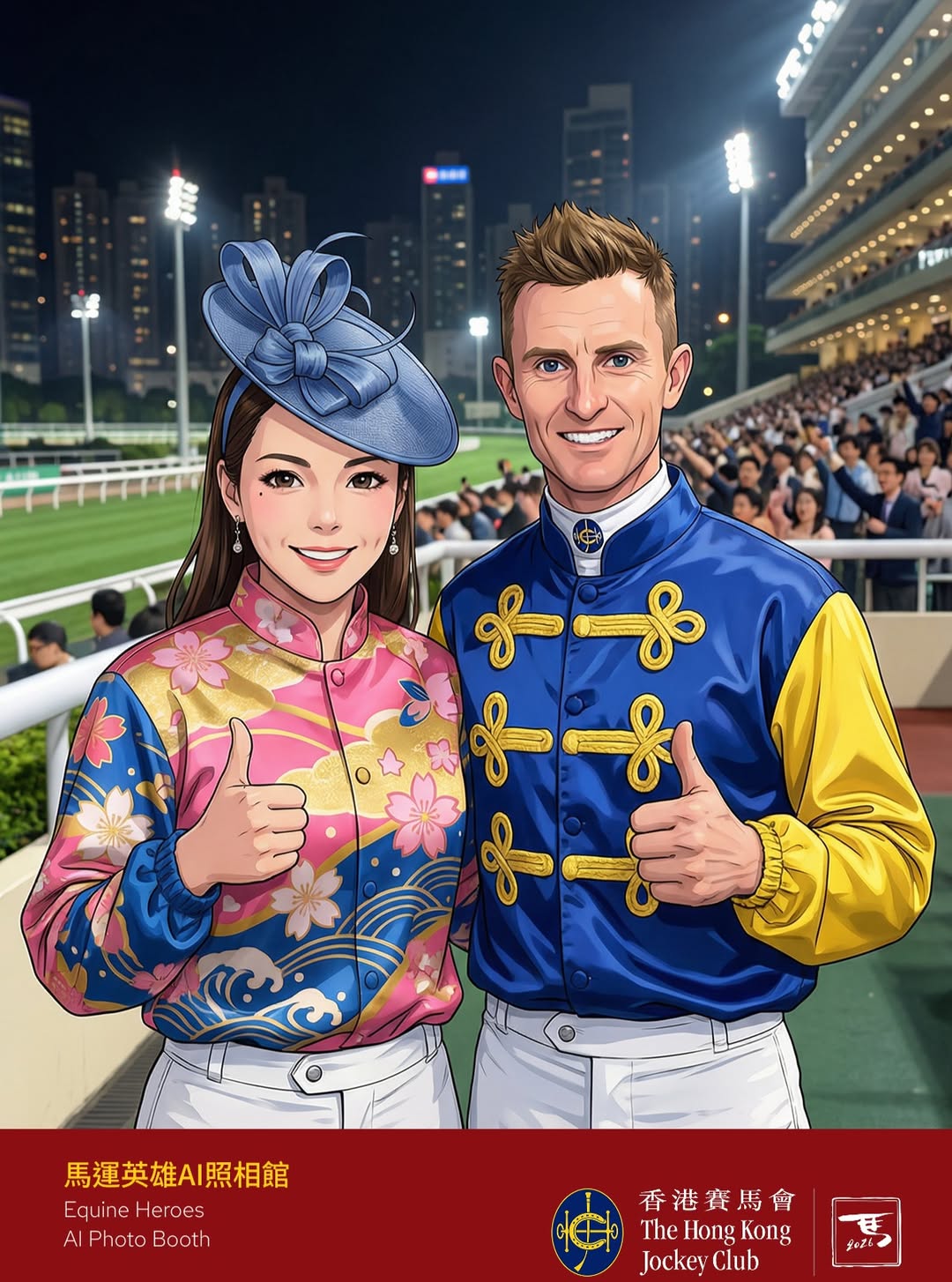
For large-scale activations — think 500+ guests at a venue like Happy Valley Racecourse — allow 45 to 60 minutes for load-in, branding checks, and a test run with the client's approved style templates.
What Hardware Is Required?
A standard AI photo booth setup from PONS.ai includes:
Component | Specification
Camera | DSLR or mirrorless (Canon EOS R series recommended)
Display | 21–32 inch touchscreen monitor, 1080p minimum
Processing | Cloud-based — no dedicated GPU on-site required
Printer (optional) | Dye-sublimation for instant physical prints
Internet | Stable Wi-Fi or 4G/5G hotspot, minimum 10 Mbps upload
Because PONS.ai processes AI transformations in the cloud rather than on local hardware, the on-site footprint is significantly smaller than competitors who rely on high-powered workstations.
How Fast Are AI Photo Transformations?
PONS.ai generates a fully styled, brand-customised AI image in approximately 10 seconds. That includes face detection, background replacement, style transfer, and branded overlay application. At peak throughput, a single station handles 300 to 400 guests per hour — more than enough for most corporate events.
For comparison, traditional photo booths that rely on local GPU processing typically take 20 to 45 seconds per image, creating longer queues and lower guest satisfaction.
What Internet Speed Do I Need?
A stable connection with 10 Mbps upload and 10 Mbps download is the minimum. For events with more than 200 concurrent guests or live social media sharing walls, we recommend a dedicated line with 50 Mbps or higher.
PONS.ai also offers an offline fallback mode that caches style models locally, so if your venue has intermittent connectivity — outdoor festivals, rooftop terraces, heritage buildings — the booth keeps running with slightly longer processing times.
How Much Does It Cost?
AI photo booth pricing varies by provider, event duration, and customisation level. Here is a general market overview for 2026:
Package | Typical Price Range | What Is Included
Half-day (4 hours) | USD 1,500 – 3,000 | 1 station, operator, unlimited photos, digital sharing
Full-day (8 hours) | USD 2,500 – 5,000 | 1 station, operator, unlimited photos, digital sharing, prints
Enterprise / Multi-day | USD 4,000 – 10,000+ | Multiple stations, custom AI styles, CRM integration, analytics dashboard
PONS.ai operates on a per-event or annual licence model for brands that run recurring activations, which can reduce per-event cost by 30 to 50 percent compared to one-off rentals.
What Customisation Is Possible?
This is where AI photo booths pull ahead of traditional setups. With PONS.ai, clients can customise:
AI style themes — transform guests into comic book heroes, oil paintings, cyberpunk characters, or any on-brand creative concept
Branded overlays — logos, event hashtags, sponsor placements baked into every output
Background replacement — any branded or themed environment, no physical backdrop needed
Output formats — square for Instagram, 9:16 for TikTok/Reels, 16:9 for event screens, or print-ready 4×6
Sharing options — QR code, email, SMS, AirDrop, direct social media upload
For a recent LONGINES International Jockeys' Championship activation, PONS.ai created custom equestrian-themed AI styles that transformed guests into stylised jockey portraits — a level of personalisation impossible with a standard photo booth.
Do I Need a Dedicated Operator?
Yes, we recommend at least one trained operator per station. The operator handles guest flow, troubleshooting, and ensures brand consistency throughout the event. For events with three or more stations, a lead technician oversees the network.
PONS.ai provides full-service staffing as part of every package, so event planners do not need to source or train separate personnel.
Quick Setup Checklist for Event Planners
Before your AI photo booth activation, confirm these items with your provider:
1. Venue power — at least one dedicated 13A socket per station
2. Internet access — wired Ethernet preferred, Wi-Fi acceptable with 10+ Mbps
3. Space — minimum 2m × 2m per station, plus 1.5m queue buffer
4. Branding assets — logos in SVG or PNG (transparent background), brand colours in hex codes
5. Style approval — review and approve AI style templates at least 48 hours before the event
6. Load-in time — allow 30 to 60 minutes depending on venue access restrictions
Ready to Set Up Your AI Photo Booth?
Book a demo with PONS.ai to see the full setup process in action and get a custom quote for your next event. Our team handles everything from creative concept to day-of execution — so you can focus on your guests.


Comments